YOUR ACCOUNT. YOUR GENERATION BUDGET.
Set up your
Higgsfield API.
An API key lets an app request images on your behalf. Higgsfield charges your API account for those generations.
01 / OPEN HIGGSFIELD
Create or sign in to your API account.
Go to the official Higgsfield API platform ↗ and complete its sign-up or sign-in flow. If onboarding asks how you will use it, choose the option that truthfully fits you or your business.
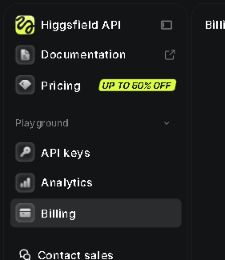
Look for API keys and Billing in the left menu. Use the API platform's balance and pricing when planning API generation costs.
Screens may change or look different on a phone. The links below open Higgsfield in a new tab.
02 / KEEP YOUR KEY PRIVATE
Create a dedicated API key.
Open API keys ↗ and select Create API key. Follow Higgsfield's prompts. If it asks for a name, use something recognisable, such as ORIGIN00 Lab.
The credential has two parts: a key ID and a secret. Save both securely, such as in your password manager. Treat the secret like a password: it can authorise use of your account.

Never put a key in a screenshot, social post, email to us, or campaign export. If it is exposed, replace it promptly through Higgsfield's key-management controls.
What does the credential format look like?
A connection may request the two values together, separated by a colon:
YOUR_KEY_ID:YOUR_KEY_SECRETThis is a placeholder, not a working key. This guide does not collect credentials.
03 / START SMALL
Review your budget before adding funds.
When you're ready to use paid generation, open Billing ↗. Review Add funds and keep Auto top-up Off if you want to avoid automatic refills.
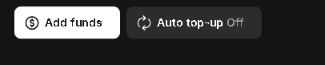
Start with a small amount you are comfortable spending, subject to the minimum shown at checkout. Check the amount, currency and payment terms before confirming. You pay Higgsfield for API generation; this guide and our saved-image demo are free.
Check current API pricing ↗ for your chosen model and settings. Prices, promotions and account discounts can change. Explore still images first; choose a concept before paying for video.
Switching off auto-top-up prevents automatic refills; it is not a per-request spending limit. Do not assume rejecting an image cancels its generation charge.
04 / WHAT HAPPENS NEXT
Connect, quote, then approve.
Open the app and find Your Higgsfield account. Paste your key ID and secret separated by a colon, read the consent and select Check and connect (no generation). A connection checks access with an estimate; it does not generate an image. If the account panel is unavailable, this deployment is in saved-image-only mode.
Build your plan, choose Get image quote on a concept, then review and confirm its price before generating. Each approved request makes one background. Saved settings, framing and exports remain free. Your product photograph is not sent to Higgsfield.
Your key passes through our server and remains only in server memory for up to one hour, until disconnect, or until restart. Download your work before disconnecting. Free hosting is temporary: the US$5 / 20-still per-key counter resets on server restart, and each image is limited to a US$0.20 quote. These are app limits, not your provider balance. Keep auto-top-up off. Video is disabled.
Successful images may be charged even if you dislike the result. Failed or moderated requests follow Higgsfield's refund rules; our conservative reservation remains until reconciliation.
Open the working demo →Official help
Higgsfield authentication and key safety ↗ · Higgsfield quick start ↗
Steps and cropped screenshots checked 19 September 2026. Higgsfield interface screenshots are included for navigation help; account details and credentials are excluded. ORIGIN00 Lab is an independent tool, not an official Higgsfield product.